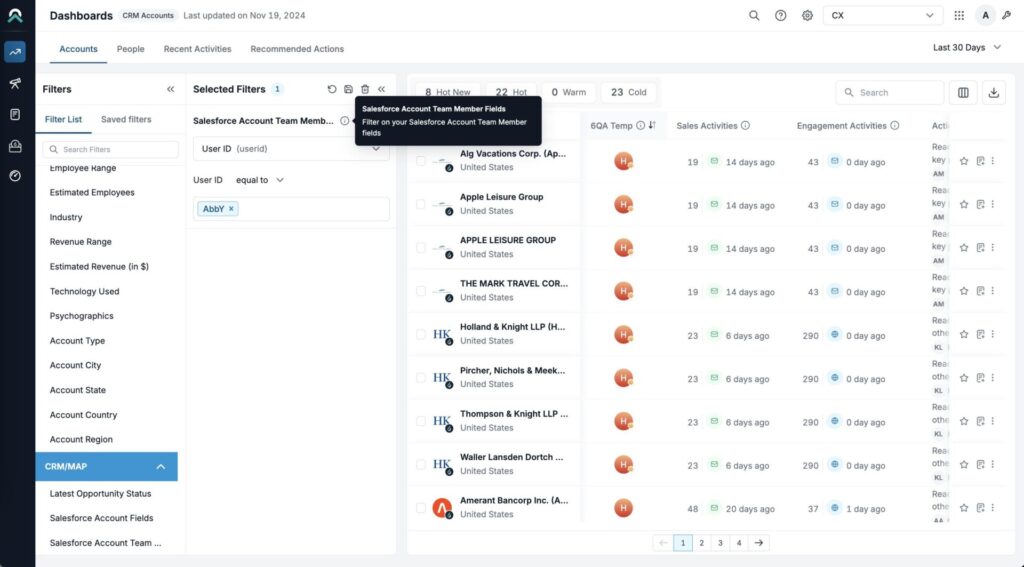
This article shows the list of all SI Dashboards filters, broken down by Dashboard.
For more information on how to use filters, see Sales Intelligence Dashboards Filters.
Accounts Dashboard filters
Filter Category | Filter Sub-Category | Filter Fields |
|---|---|---|
CRM | User type | Select a user type, then select a specific user |
Account type | Select from your configured account types | |
Latest opportunity status |
| |
CRM account fields | Select from your individual CRM account field values or CRM filter value sets. Learn more about filter value sets. | |
6sense firmographics (headquarters) | Employee range |
|
Estimated employees | Filter down companies with estimated employee count using “equal”, “greater than”, or “less than” operators | |
Industry | Select from a list of industries and sub-industries | |
Revenue range |
| |
Estimated revenue (in $) | Filter down companies with estimated annual revenue (in USD) using “equal”, “greater than”, or “less than” operators | |
City (Company) | Search for a city | |
State (Company) | Search for a state | |
Country (Company) | Search for a country | |
Region (Company) | Search for a region | |
6sense intent | Temperature |
|
Buying stage |
| |
Reach |
| |
Sales activity |
| |
6QA status |
| |
Profile fit |
| |
Technology used | Select from your configured technologies, then select a status and confidence score | |
Psychographics | Select from your configured psychographics |
People Dashboard filters
Filter Category | Filter Sub-Category | Filter Fields |
|---|---|---|
CRM | User type | Select a user type, then select a specific user |
Account type | Select from your configured account types | |
Latest opportunity status |
| |
CRM account fields | Select from your individual CRM account field values or CRM filter value sets. Learn more about filter value sets. | |
6sense firmographics (headquarters) | Employee range |
|
Estimated employees | Filter down companies with estimated employee count using “equal”, “greater than”, or “less than” operators | |
Industry | Select from a list of industries and sub-industries | |
Revenue range |
| |
Estimated revenue (in $) | Filter down companies with estimated annual revenue (in USD) using “equal”, “greater than”, or “less than” operators | |
City (Company) | Search for a city | |
State (Company) | Search for a state | |
Country (Company) | Search for a country | |
Region (Company) | Search for a region | |
6sense intent | Temperature |
|
Buying stage |
| |
Reach |
| |
Sales activity |
| |
6QA status |
| |
Profile fit |
| |
Technology used | Select from your configured technologies, then select a status and confidence score | |
Psychographics | Select from your configured psychographics | |
6sense people info | Priority profile | Select true or false. |
Engagement trend |
| |
Job level |
| |
Job function |
| |
Persona importance |
| |
City (people) | Search for a city | |
State (people) | Search for a state | |
Country (people) | Search for a country |
Recent Activities Dashboard Filters
Filter Category | Filter Sub-Category | Filter Fields |
|---|---|---|
CRM | User type | Select a user type, then select a specific user |
Account type | Select from your configured account types | |
Latest opportunity status |
| |
CRM account fields | Select from your individual CRM account field values or CRM filter value sets. Learn more about filter value sets. | |
6sense firmographics (headquarters) | Employee range |
|
Estimated employees | Filter down companies with estimated employee count using “equal”, “greater than”, or “less than” operators | |
Industry | Select from a list of industries and sub-industries | |
Revenue range |
| |
Estimated revenue (in $) | Filter down companies with estimated annual revenue (in USD) using “equal”, “greater than”, or “less than” operators | |
City (Company) | Search for a city | |
State (Company) | Search for a state | |
Country (Company) | Search for a country | |
Region (Company) | Search for a region | |
6sense intent | Temperature |
|
Buying stage |
| |
Reach |
| |
Sales activity |
| |
6QA status |
| |
Profile fit |
| |
Technology used | Select from your configured technologies, then select a status and confidence score | |
Psychographics | Select from your configured psychographics | |
6sense people info | Priority profile | Select true or false. |
Engagement trend |
| |
Job level |
| |
Job function |
| |
Persona importance |
| |
City (people) | Search for a city | |
State (people) | Search for a state |
Recommended Actions Dashboard Filters
Filter Category | Filter Sub-Category | Filter Fields |
|---|---|---|
CRM | User type | Select a user type, then select a specific user |
Account type | Select from your configured account types | |
Latest opportunity status |
| |
CRM account fields | Select from your individual CRM account field values or CRM filter value sets. Learn more about filter value sets. | |
6sense firmographics (headquarters) | Employee range |
|
Estimated employees | Filter down companies with estimated employee count using “equal”, “greater than”, or “less than” operators | |
Industry | Select from a list of industries and sub-industries | |
Revenue range |
| |
Estimated revenue (in $) | Filter down companies with estimated annual revenue (in USD) using “equal”, “greater than”, or “less than” operators | |
City (Company) | Search for a city | |
State (Company) | Search for a state | |
Country (Company) | Search for a country | |
Region (Company) | Search for a region | |
6sense intent | Temperature |
|
Buying stage |
| |
Reach |
| |
Sales activity |
| |
6QA status |
| |
Profile fit |
| |
Technology used | Select from your configured technologies, then select a status and confidence score | |
Psychographics | Select from your configured psychographics | |
6sense people info | Priority profile | Select true or false. |
Engagement trend |
| |
Job level |
| |
Job function |
| |
Persona importance |
| |
City (people) | Search for a city | |
State (people) | Search for a state | |
Country (people) | Search for a country |
Other Filters
The following filter can be made available on Discovery and all Dashboards, but must be enabled by raising a support ticket.
Filter Category | Filter Name | Filter Fields |
|---|---|---|
CRM/MAP | Salesforce Account Team Member Fields | Select the User ID field to select specific users or other fields as applicable |