The explainable scores group of features is in Open Beta. Information may change. Contact your Customer Success Manager for questions.
“Explainability” is the term we use to describe a set of capabilities that explain how 6sense AI comes to conclusions and provides suggestions.
Explainability is about “why” and “how” questions. Answers drive understanding and build trust about how our AI models operate.
Explainable scores are specifically about our Predictive model scores. Currently we support the following models:
6QA: For example, why is a company designated as 6QA?
Buying stage: For example, why is a company in its particular buying stage?
Company profile fit: For example, how does the model define a company as a good fit for your business?
The explainable scores are available to you in various 6sense interfaces, including:
Model center — also refer to Account Scores Explained in the Model Center.
For high-level discussions refer to How Transparent AI Reasoning Will Fuel Agentic GTM and Agentic GTM That Makes Sense (requires login).
How RevvyAI explains scores
In RevvyAI for Revenue Marketing, you can ask “why” and “how” questions, in addition to “what” questions.
You can ask questions such as:
Why accounts are designated as 6QA accounts.
How the profile fit model matches the accounts your organization has won.
What activity caused the buying stage model to move an account into its buying stage.
For example, ask RevvyAI “why is [account] a 6QA?” RevvyAI provides the data and suggest relevant follow-up questions.

Refer to RevvyAI in Revenue Marketing.
How explainable scores help Revenue Marketing users
RevM (ABM) users can review the reasons behind a the Predictive scores of an account.
As a marketer, you can understand why an account has a given score, giving you more confidence to act.
You can trust Predictive scores more because the reasoning is visible and accessible in the places you already work.
You can get a seller-friendly explanation without needing to interpret technical score logic or manually inspect multiple signals.
The account details (Discover) page for a company now has a link to its score details.

When you select the link, 6sense tells you more about an account’s Predictive scores.

How explainable scores help Sales Intelligence users
Sales users can review the reasons behind a 6sense recommendation.
As a seller, you can understand why an account is prioritized, giving you more confidence to act.
You can trust Predictive scores more because the reasoning is visible and accessible in the places you already work.
You can get a seller-friendly explanation without needing to interpret technical score logic or manually inspect multiple signals.
You can validate whether a score is useful before deciding how to prioritise outreach or research.
You can provide feedback when an explanation feels unhelpful or incorrect, improving the long-term quality of the experience.
In the SI Account page Intent by country tab, select the Score details link.

The Score details link opens a popup with explanations about the company’s scores.

For more high-level discussion refer to our Step-by-Step Guide for BDRs Working 6QAs.
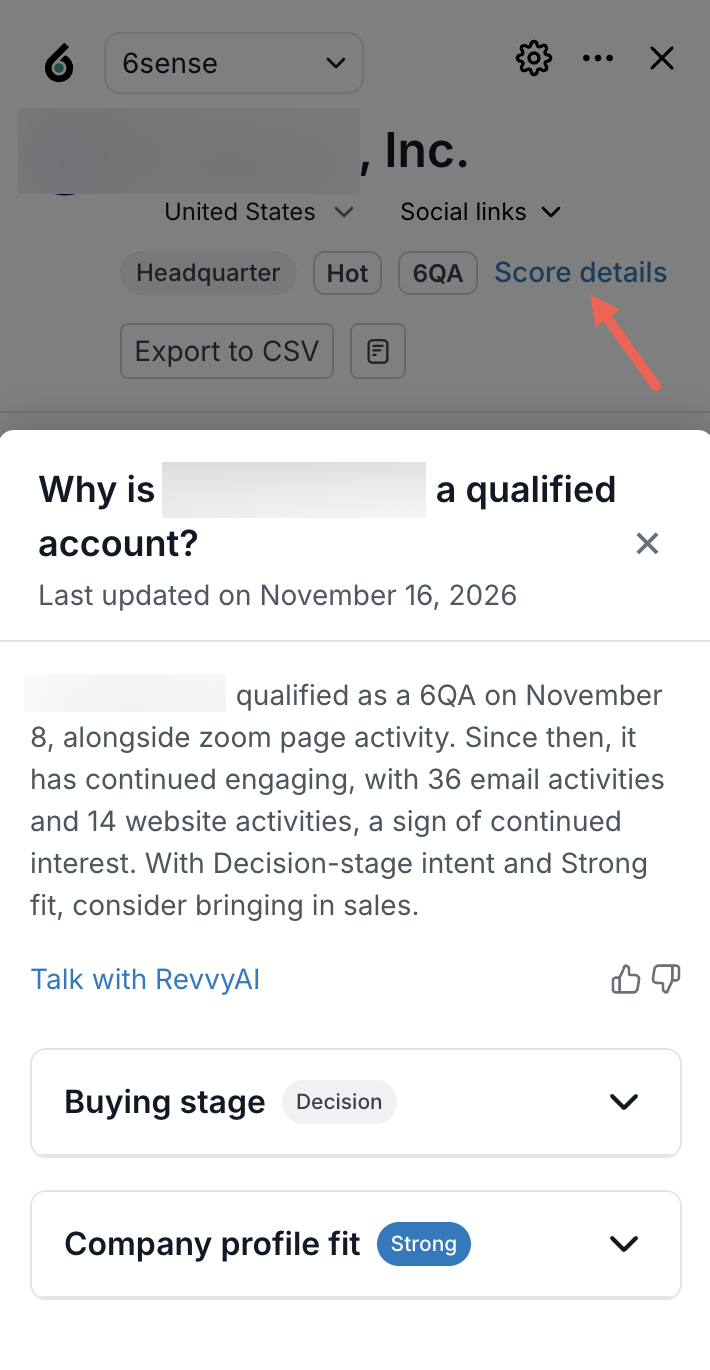
Explainable scores in the SI Chrome Extension
The SI Chrome Extension includes a Score details link that provides the score explanations.
How explainable scores help RevOps users (6sense Administrators)
As an Administrator, explainability features help you understand how models work at a fundamental level, such as:
What factors affect the model?
What weightings are given to them?
What is the distribution of companies across the model scoring?
What is the list of all accounts and each one’s model score?
6sense provides the new Model Center feature for Administrators. 
The Model center includes a list of all accounts and their model score statuses. For more detailed information refer to Models in the Model Center.
The Model center also provides explained scores for each account. Refer to Account Scores Explained in the Model Center.
.png)


How explainable scores help MCP users
The same explainability functionality in RevvyAI is available to Model-Context-Protocol (MCP) users. For example, in a Claude environment that integrates with 6sense MCP you can ask about 6QA accounts. If you have more than one Predictive model, Claude prompts you to select it.

Document changelog
Nov 17 2026: First release Open Beta