Beginning on May 22nd, 2025, 6sense replaced the existing Sales Intelligence (SI) plans (Team, Growth, Enterprise, Enterprise Lite) with a single license. This new license can include the following:
Credits: Credits allow you to purchase, unlock, and export new contacts or company data. If you run out of credits your organization will still have access to all features, but more credits must be purchased to purchase more contacts. Credits can also be spent to generate AI Writer emails.
Predictive: Enhances the data with AI to improve your results for temperature, profile fit, and 6sense Qualified Account (6QA) status.
Credits and Predictive: Access to all features in SI.
Under the new single license plan, all SI users will be able to see all pages and dashboards.
Existing SI plans vs. single license
If you are currently an SI customer, your Team, Growth, Enterprise, or Enterprise Lite plans will change to the following:
Team: Customers with Team licenses will now have the single license with credits, and no predictive. In the SI product they will have access to all functionality that isn’t predictive.
Growth: Customers with Growth licenses will experience no changes to their functionality, but will now have the single license with credits, and no predictive. In the SI product they will have access to all functionality that isn’t predictive.
Enterprise: Customers with Enterprise licenses will now have the single license with both credits and predictive. In the SI product they will have access to all functionality.
Enterprise Lite: Customers with Enterprise licenses will now have the single license with predictive, and no credits. In the SI product they will have access to Discovery and Lists, but will not be able to purchase or export contacts. They will now have access to the Chrome extension.
Mixed Enterprise/Enterprise Lite: Customers who have mixed plans of Enterprise and Enterprise Lite will now have the single license with both credits and predictive. In the SI product they will have access to all functionality. Users will be separated by Lite and Full Access in product user management.
Admins will now be able to manage their user’s license level from within user management, rather than having to contact their CSM to adjust this.
Full Access: Access to all functionality.
Lite: Access to all functionality except acquiring contacts, global search, and spending credits for anything except generating AI Writer emails.
User management
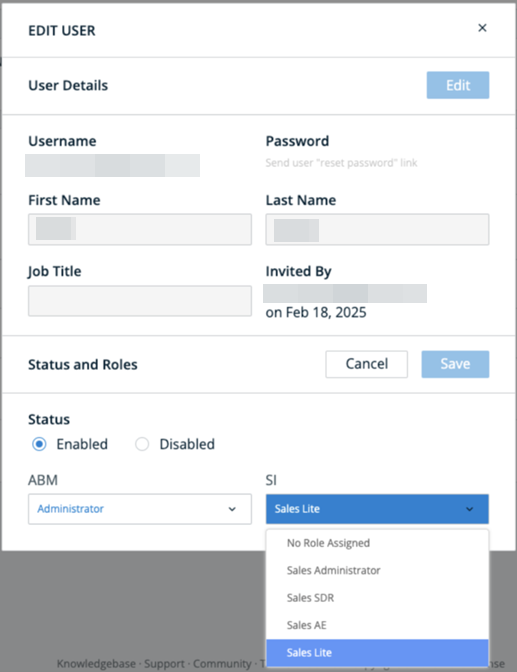
Admins can change their users’ license levels by navigating to User Management. Click on the user you want to edit, and select the license level for SI from the dropdown.
Roles admins can assign
Sales Administrator: Admins who manage the SI instance. Sales admins can invite and manage only non-admin roles for SI.
Sales SDR: Sales Development Representative that only has access to SI Dashboards and Discovery.
Sales AE: Account executive that only has access to SI Dashboards and Discovery.
Sales Lite: No access to credits except for generating AI Writer emails. Lite users cannot purchase or export contacts.