While building Advertising campaigns, you may need to exclude specific accounts from segments. You can do this by adding filters manually, creating separate exclusion lists, or configuring global rules.
However when you need to exclude accounts on an ad-hoc basis, you can quickly and directly exclude selected accounts from within a segment’s account list.
Listed accounts are sourced by their Master Identifier (MID), so the list may contain rows that have the same Name value but different Location values. For example, if you intend to exclude all Acme Inc. accounts at all locations, select each one.
Exclude accounts from a segment using an Exclude Company filter
To exclude accounts from a segment:
For the relevant segment, go to its Accounts tab.
Select the accounts from the list. Use Search if needed.
At the upper right of the table, select Exclude.
.png)
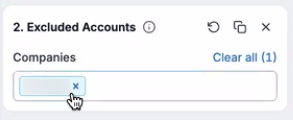
RevM automatically creates an Excluded Accounts filter containing the accounts to be excluded.
Save the segment.
Remove accounts from the Excluded Accounts filter
To remove accounts from the Excluded Accounts filter:
For the relevant segment, go to its Accounts tab.
Select the Excluded Accounts filter.
Select the X for a particular account or select Clear all.
Save the segment.
FAQ: Exclude accounts from a segment
If accounts are excluded mid-way through an activation, will reports show historic data?
Segment performance reports will show the account as being present in the segment before the exclusion took place. Segment analytics will not, as it is a snapshot of current accounts.
When do changes reflect in activation?
Some activations like reports update almost immediately (as it is a filter edit), while others like ads require a pipeline run.