You can exclude an Advertising inventory domain URL to have more control over where your brand ads should appear. Excluding ad inventory at an organizational level ensures that all campaigns running under that organization will not display ads on the excluded publisher inventory.
You can also exclude ad inventory at the campaign level. We recommend setting your minimum exclusions at the organization-level and fine-tuning other exclusions on a per-campaign basis.
When an ad inventory domain URL is excluded under an organization, all 6sense campaigns running across that organization will reject any placement request coming from that publisher domain. The campaign ad will not display on the excluded publisher’s site.
6sense has already excluded a set of publishers that are categorized as malicious and deceptive across the industry. We do not accept ad requests from these publishers regardless of whether they have been excluded by our end users.
For other types of exclusions refer to Data Exclusions.
Exclude particular publishers at the campaign level
To exclude publishers at the campaign level:
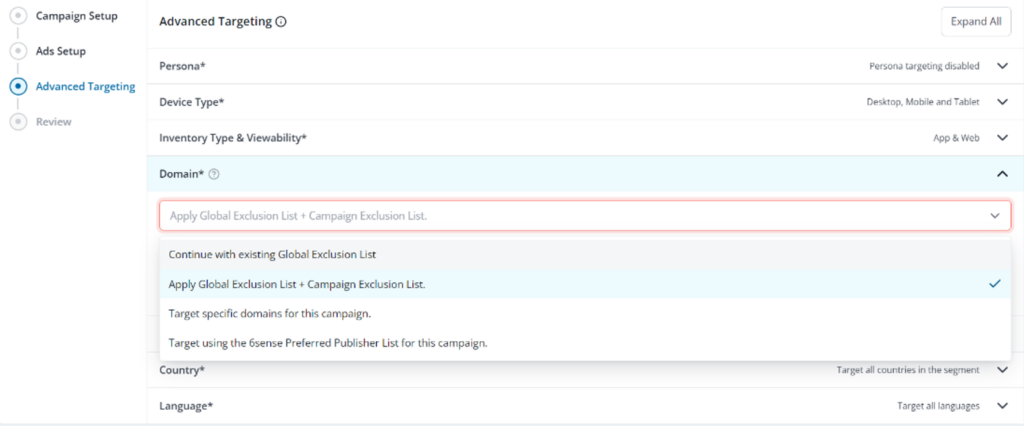
In the Campaign Setup Page, go to Advanced Targeting.
Select Domain > Apply Global Exclusion List + Campaign Exclusion.
You can manually add domains, or you can upload the CSV file.
You can enter domains or subdomains that you wish to exclude. For example:Example domains and subdomains
Exclusion
answers.com
technology.answers.com
https://www.answers.com
www.answers.com
https://www.technology.answers.com
www.technology.answers.com
answers
technology.answersAd requests from any page under answers.com domain and technology.answers.com subdomain will be rejected for displaying ads.
Save/submit your changes.