6sense AI surfaces contacts from accounts that engaged with your persona-targeted advertising campaigns. For context information refer to Use AI-Recommended Leads from Ad Campaigns.
The AI-recommended leads feature is in Beta. Contact your CSM for questions. Refer to the Terms of Service during the Beta Period.
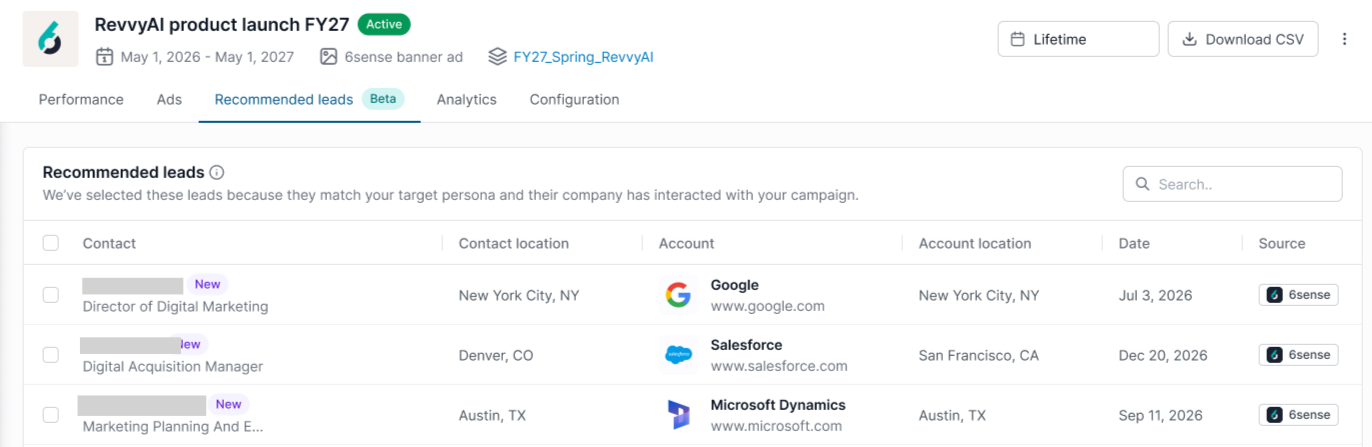
The Advertising Campaign Details > Recommended leads tab surfaces recommended contacts from accounts that engaged with your persona-targeted advertising campaigns. You can review recommended contacts in the Recommended leads tab and download them for sales and marketing follow-up activities.
Tip: Use the delivery timeframe filter at the top right to focus the results. By default the tab displays data from the entire lifetime of the campaign. You can narrow it to the last 7 or 30 days, or set a custom date range.
How the recommended leads feature works
The 6sense recommended leads feature selects recommended contacts using campaign targeting criteria and engagement signals and displays them in the Advertising > Campaign Details > Recommended Leads tab.
Recommended leads are based on the personas selected for the campaign using the persona targeting feature.
Recommended leads does not identify the specific individuals who clicked your ads. Instead, it recommends contacts who match your campaign's persona targeting criteria and are associated with engaged accounts.
Recommended leads notes and limitations
Recommended leads is available only for eligible 6sense display campaigns. LinkedIn and External campaigns are not supported.
Up to two contacts can be recommended per account.
When multiple contacts qualify, recommendations prioritize geographic proximity and email quality.
Contacts recommended within the previous 90 days are not recommended again.
Recommendations refresh daily.
Persona targeting must be configured for the ad campaign.
Prerequisite: Configure persona targeting to enable the recommended leads feature
To generate recommended leads, your campaign must use persona targeting. Follow these instructions to enable it. Also refer to the Persona Targeting reference.
Open the campaign.
Go to Advanced Targeting.
Under Persona, select Target specific personas.
Choose the personas you want to target.
Save the campaign.
Note: Campaigns without persona targeting do not generate recommended leads.
How accounts and contacts become eligible as recommended leads
To be eligible for recommendation:
The account must be included in the campaign's target segment.
The account must have generated at least one ad click.
The contact must match the campaign's persona targeting criteria, including job function and job level.
The contact must have a verified email address that meets quality requirements.
How multiple contacts are prioritized
When multiple contacts qualify for recommendation, contacts are prioritized using:
Geographic proximity to the engagement location:
City match
State match
Country match
Email quality: When geographic proximity is equal, contacts with higher email quality are prioritized.
Recommended leads and opt-in or opt-out contact data
Recommended leads are not opted-in contacts. They have the same compliance posture as other business contacts available through 6sense.
Recommended leads do not use a separate data source. The contacts are sourced from the same 6sense contact database used by Sales Intelligence and are subject to the same privacy, compliance, and rights-management processes.
For contacts in the EU, UK, and Switzerland, 6sense provides Article 14 notifications and supports opt-out and erasure requests through the 6sense Privacy Center.
The difference is how the contacts are surfaced. Recommended leads are surfaced based on campaign engagement rather than being drawn from a Sales Intelligence credit pool.
Your organization's existing processes for using 6sense contact data also apply to tecommended leads. For example, if your organization requires consent before marketing outreach in certain jurisdictions, the same consent management practices should be followed for recommended leads.
View recommended leads
To view recommended leads:
Open the advertising campaign.
Go to the Campaign Details page.
Select the Recommended leads tab.
Download recommended leads as a CSV file
To export recommended leads as a CSV file:
Open the campaign.
Select Download CSV.
Select Recommended leads.
Select Download
Troubleshooting: Why recommended leads may not be available
Message | Reason | What to do |
|---|---|---|
Persona targeting is required | The campaign does not use persona targeting. Recommended leads are generated based on the personas selected for a campaign. | Edit the campaign and configure persona targeting under Advanced Targeting. |
Contact Data Compliance agreement is required | Your organization has not completed the Contact Data Compliance agreement required to access contact recommendations. | Contact your Customer Success Manager (CSM) to complete the agreement. |
Campaign is not supported | The campaign started before the supported date for Recommended Leads. | Recommended Leads are only available for eligible campaigns. Review the date requirements shown in the application. |
Campaign budget is exhausted | The campaign has exhausted its budget and is no longer generating eligible engagement for recommendations. | Increase the campaign budget or wait for additional eligible engagement. |
No recommendations available yet | No eligible campaign engagement is available. Recommended Leads are generated from accounts with people who engage with the campaign. | Allow the campaign to continue running and check again after additional engagement is recorded. |