Keywords are topical words or phrases that represent your company’s market, solutions, or customer needs. Setting up keywords helps sellers uncover what their prospects are researching, based on the keywords that your Administrator sets up within 6sense.
For more information about keywords, refer to Keywords Overview.
Where keywords reveal account research activities in SI
To see what keywords were researched by a particular account, in SI:
Select an account from any account list to open its Account Details page.
Select the Signals tab.
Select the Keywords or Keyword groups tab.
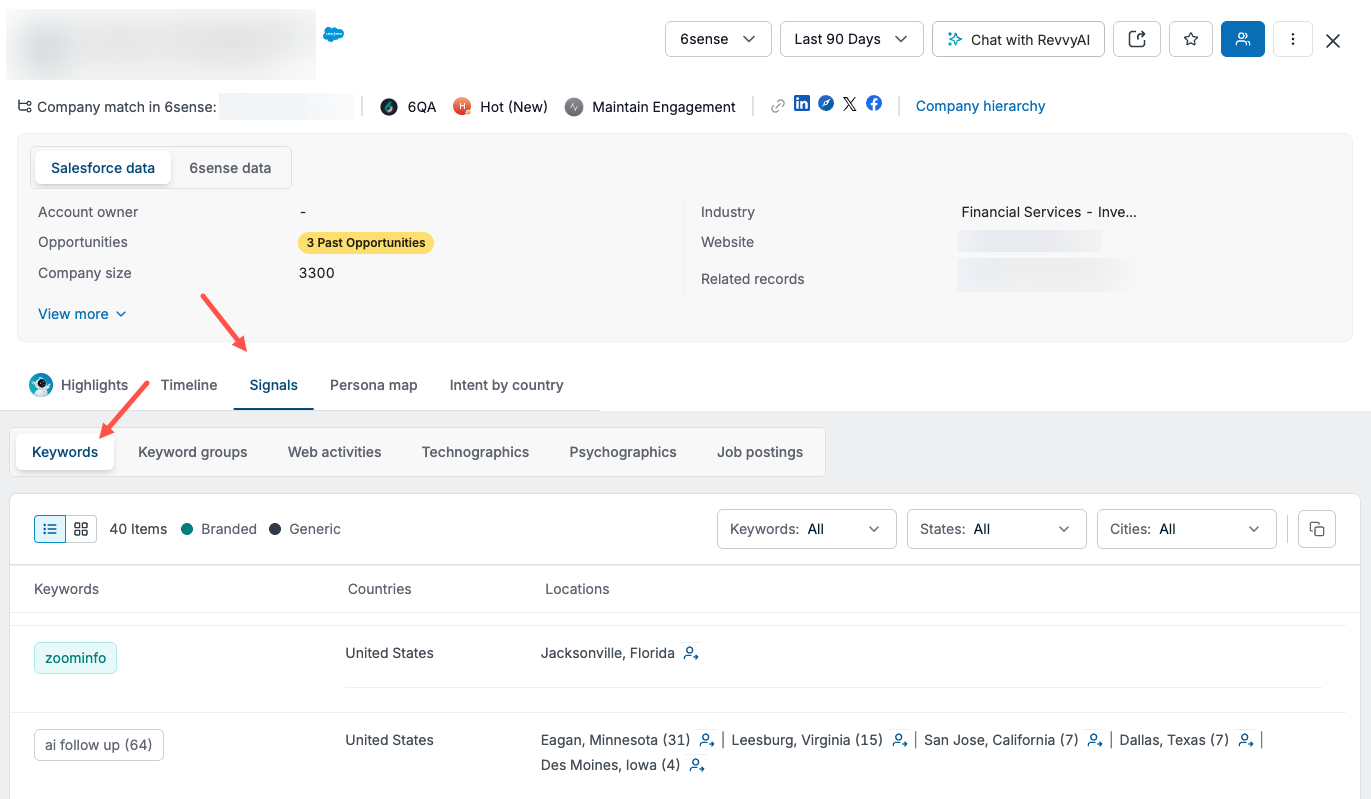
To find out more about individual people, select the people icon or Find all people from these locations.

The Discovery page opens, with pre-populated filters matching the people, locations, and account, and lists the known contacts.
The Keyword groups tab works much the same way as the Keywords tab.
What keywords indicate in SI
Branded keywords generally indicate late-stage research activity around your or your competitors’ products or services.
Generic keywords generally indicate early-stage research and do not include brands or branded words.
For recommendations in setting up branded and generic keywords, refer to Best Practices for Selecting and Adding Keywords.
Add keywords for SI
To add or update keywords for Sales Intelligence, refer to Add Keywords. Only users with Primary Administrator or Administrator access can add and manage keywords.
Tip: After a new keyword is added, it may take 24-48 hours to see new data in Sales Intelligence for that keyword. There will be a seven-day history or “look back” once new keywords are updated and reflected in SI.
Best practices for keywords in SI
Also refer to Best Practices for Selecting and Adding Keywords.
Update keywords regularly
As a seller or sales manager, it’s a best practice to work with your go-to-market (GTM) team to keep your keywords up to date. For example, if a new competitor comes into your market, add their company name and any branded products or services to 6sense as new keywords.
We recommend collecting feedback from end users and checking your keywords regularly, ideally every quarter or twice a year. Some popular, high-volume keywords might distract sellers, so it’s important to either provide more context for those keywords or remove them. Overall, your keyword strategy should be dynamic, ensuring it remains useful for end users and aligns with your go-to-market strategy.
For instructions, refer to Add Keywords and Deactivate or Reactivate Keywords.