Admins can configure how AI and MCP capabilities are enabled and governed across 6sense.
AI and MCP capabilities can help your teams work more efficiently with 6sense by surfacing relevant insights and in some cases perform actions on your behalf. Many organizations require administrative controls to align AI and MCP usage with internal security, privacy, legal, and compliance policies.
Before you adjust AI and MCP settings, review your organization’s internal policies for AI and MCP usage, customer data, privacy, legal review, and third-party integrations.
Manage AI and MCP settings
Navigate to Settings > AI and MCP.
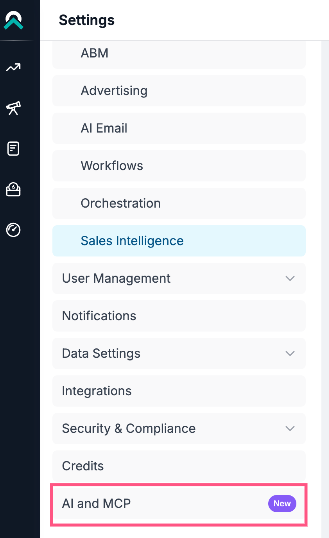
By default, AI and MCP feature control is turned off. Select the toggle to turn on AI and MCP.

6sense supports managing AI and MCP settings for the following AI and MCP capabilities:
RevvyAI insights and chats
RevvyAI for Sales Intelligence
RevvyAI insights and chats
Enable or disable supported AI and MCP features based on your organization’s policies.
You can also use the master toggle (Control access to AI and MCP for your organization) to enable or disable all supported AI and MCP capabilities for your organization at once.
FAQ
Who can access AI and MCP Settings?
Primary administrators and application administrators have access to managing the AI and MCP page.
Can I enable only certain AI and MCP capabilities?
Yes, you can turn individual AI and MCP capabilities on or off for your organization.
Can I enable RevvyAI for some users but not others?
As long as the AI setting for RevvyAI is turned ON, it will be available to all users. However, you can use custom roles to tailor permissions for RevvyAI with no access and assign it to the set of users who don’t need to have access.
How does RevvyAI handle sensitive information?
RevvyAI respects role-based access controls (RBAC) at the individual user level. Users can only access data they are already authorized to see based on their existing role.
What models are used to power RevvyAI?
RevvyAI uses a combination of:
Large language models (LLMs) from OpenAI and Anthropic.
6sense data.
Previously synced CRM and MAP data (if available).
Does RevvyAI integrate directly with my CRM or MAP?
No. However, it can retrieve CRM and MAP data that has already been synced into 6sense.
For example, for a Predictive customer, RevvyAI can answer “how many unworked 6QAs are present in CRM”.