6sense Sandbox is a separate testing environment connected to your Production instance. Use Sandbox to validate supported integrations, mappings, exports, and workflows before enabling changes in Production.
The updated Sandbox experience includes:
Self-service creation by the Primary Administrator.
Production and Sandbox navigation through the app switcher.
Sandbox membership managed from Production.
Guided workflow promotion from Sandbox to Production.
About 6sense sandbox
The 6sense sandbox is a separate instance that mirrors a production environment while providing a safe space to test features and workflows.
Use cases for the 6sense sandbox
Experiment with new features before production deployment.
Test integration workflows and validate data syncs.
Verify export capabilities within a controlled setting.
Sandbox options
Onboarding Sandbox and Standard Sandbox provide the same core functionality. They differ in access period and Predictive Model eligibility.
Offering | Use case | Access period | Predictive Models |
|---|---|---|---|
Onboarding Sandbox | Net-new customer onboarding | 90 days from activation | Not available |
Onboarding Sandbox Extension | Additional onboarding time | One additional 90-day period | Not available |
Standard Sandbox | Ongoing testing | Customer contract term | Available through a separate purchase and Professional Services SOW |
Before you begin
Only the Primary Administrator can create a Sandbox.
Only one Sandbox can be provisioned per Production instance.
Users must be active in Production before they can be added to Sandbox.
Users must authenticate through Production before opening Sandbox.
Create your Sandbox
Sign in to the Production instance as the Primary Administrator.
Go to Settings > Organization Settings > Sandbox.
Select Create sandbox.
Enter the Sandbox instance name and complete the creation process.
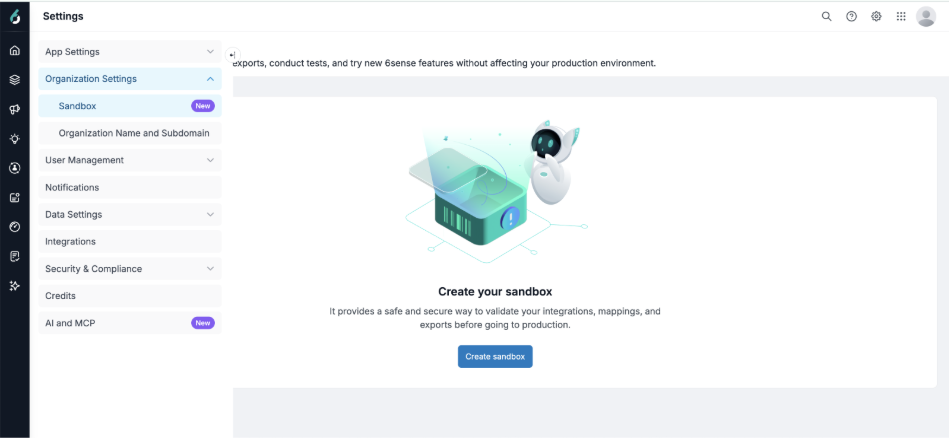
The Sandbox subdomain is generated automatically. You can later update the instance name and subdomain in Sandbox under Settings > Organization Settings > Organization Name and Subdomain.
Open and manage Sandbox
After creation, the Sandbox page shows the active Sandbox and provides access to available management options. Authorized users can also open Sandbox from the app switcher.
.png)
Add users to Sandbox
All users must be added to Sandbox from the Production instance.
Only active Production users can be added.
The Primary Administrator manages Sandbox membership from Production User Management.
Disabling or deleting a user in Production removes the user's Sandbox access.
.png)
Switch between Production and Sandbox
Authorized users can open Sandbox from the app switcher after authenticating through Production.
.png)
Direct sign-in to Sandbox isn't supported. Users must first authenticate through the Production environment before accessing Sandbox.
Important: Production and Sandbox can't remain authenticated at the same time. Opening Sandbox signs you out of Production, and opening Production signs you out of Sandbox. Save your work before switching environments.
WebTag
Ensure the 6sense WebTag has been placed on your website.
If you’ve placed the 6sense WebTag on your website, it will also work for the 6sense sandbox.
If the web tag has not yet been installed, please contact your 6sense representative for installation support.
Predictive Models in Sandbox
Predictive Models aren't available in Onboarding Sandbox.
Predictive Models can be added to Standard Sandbox through a separate purchase and Professional Services SOW.
Contact your 6sense Customer Success Manager for more information.
Onboarding Sandbox
Onboarding Sandbox provides a time-limited Sandbox for onboarding. Onboarding Sandbox is available for 90 days from activation.
If you need additional onboarding time, an Onboarding Sandbox Extension provides one additional 90-day period.
For ongoing access, contact your 6sense Customer Success Manager about Standard Sandbox.
Test in Sandbox
Use Sandbox to validate supported setup and behavior before enabling changes in Production:
Integration connections and permissions.
Data synchronization.
Field mappings and standardization.
Sales Intelligence exports to supported Sandbox destinations.
Data Workflow execution.
Audience Workflow execution for supported destinations.
Export and write behavior in supported destinations.
Important: Ensure that your Sandbox CRM contains the fields, objects, permissions, and other configuration required for your testing. Differences between your Sandbox CRM and Production CRM can result in different data or behavior in 6sense.
Sandbox credits
Sandbox uses a separate credit pool from Production. New Sandboxes receive 1,000 Data credits. Sandbox credit usage doesn't consume Production credits.
Sandbox capabilities
The following capabilities are confirmed at a high level:
Capability | Onboarding Sandbox | Standard Sandbox |
|---|---|---|
Integration validation | Supported | Supported |
Field mappings and standardization | Supported | Supported |
Sales Intelligence export validation | Supported | Supported |
Data Workflows | Supported | Supported |
Audience Workflows | Supported for compatible destinations | Supported for compatible destinations |
Predictive Models | Not available | Separate purchase and Professional Services SOW required |
AI Email | Not supported | Not supported |
Onboarding Sandbox expiration
Onboarding Sandbox is de-provisioned 90 days after activation unless an Onboarding Sandbox Extension or Standard Sandbox has been contracted.
Contact your 6sense Customer Success Manager before the access period ends if you need:
One additional 90-day Onboarding Sandbox Extension.
Ongoing access through Standard Sandbox.
In-Platform Sandbox predictive score exports
In-Platform Sandbox predictive score exports are separate from Onboarding Sandbox and Standard Sandbox. This capability supports testing predictive score exports to a Salesforce CRM Sandbox instance through Orchestrations. This belongs specifically to the In-Platform capability, not Onboarding or Standard Sandbox.
6sense In-Platform Sandbox support
Supported
6sense supports predictive score exports based on Production data to Salesforce CRM Sandbox environments through Orchestrations.
You can use predictive score exports in your Salesforce CRM Sandbox to:
Validate that scores populate correctly in your CRM.
Test the impact of 6sense enrichment in conjunction with CRM automation.
Demonstrate 6sense values within your CRM for internal stakeholders.
Not supported
6sense does not support:
Data imports into the platform.
MAP or other non-CRM sandbox integrations.
Connect a Salesforce CRM Sandbox for predictive score exports
Prerequisite tasks
Connect your production Salesforce instance to 6sense using production credentials.
Work with 6sense representatives to finalize data mastering.
Ensure your predictive model is live and based on production CRM data.
Ensure that the 6sense integration user has write access to necessary CRM fields.
The sync process consumes API limits, so set appropriate thresholds.
The initial sync includes all scored records, while subsequent syncs update changed scores only.
Connect your Salesforce sandbox
In Revenue Marketing, go to Settings > Integrations > All Integrations.
Select Salesforce (Sandbox).
Enter your Salesforce CRM Sandbox credentials and configure API limits.
Set up the mapping profile and export orchestration for score synchronization.
FAQ
What changed from the previous Sandbox experience?
Customers could already test in Sandbox. The updated experience makes Sandbox easier to create, access, and manage:
Self-service creation from Settings > Organization Settings.
Production and Sandbox navigation through the app switcher.
Sandbox membership managed from Production.
Guided workflow promotion to Production.
90-day onboarding and ongoing Sandbox options.
What is the difference between Onboarding Sandbox and Standard Sandbox?
Both offerings provide the same core functionality. They differ in access period and Predictive Model eligibility.
Onboarding Sandbox is available for 90 days from activation. Standard Sandbox is available for the customer contract term.
Predictive Models aren't available in Onboarding Sandbox. They can be added to Standard Sandbox through a separate purchase and Professional Services SOW.
Can Onboarding Sandbox be extended?
Yes. An Onboarding Sandbox Extension provides one additional 90-day period. Contact your 6sense Customer Success Manager before the current access period ends.
Who can create a Sandbox?
Only the Primary Administrator can create a Sandbox from the Production instance.
Can more than one Sandbox be created?
Only one active Sandbox can be provisioned per Production instance at a time.
How are users added to Sandbox?
Sandbox access is managed from Production User Management. Only active Production users can be added. If a user is disabled or deleted in Production, the user's Sandbox access is also removed.
Can Production and Sandbox stay open in separate tabs?
The tabs can remain open, but only one environment remains authenticated at a time. Opening Sandbox signs you out of Production, and opening Production signs you out of Sandbox. Save your work before switching environments.
Can I sign in directly to Sandbox?
No. Authenticate through Production, and then open Sandbox through the app switcher.
What can I test in Sandbox?
You can validate supported integration connections and permissions, data synchronization, field mappings and standardization, Sales Intelligence exports, and workflow execution and export behavior.
Can I promote a workflow from Sandbox to Production?
Yes. Supported workflows can be promoted from Sandbox to Production through a guided validation flow. You can promote a workflow while it is in Draft or Published status.
The Draft/Published detail comes from the PM confirmation you received in this conversation.
Does promotion change my Sandbox workflow?
No. The original Sandbox workflow remains unchanged. Promotion creates a new workflow in Production.
Can I promote a workflow from Production to Sandbox?
No. Promotion is one-way from Sandbox to Production.
Are mapping profiles promoted with the workflow?
No. Mapping profiles aren't promoted with the workflow. Configure the required mapping profile in Production before publishing the promoted workflow.
Can I delete my Sandbox?
You can't delete a Sandbox directly from 6sense. Contact 6sense Support if you need to deactivate your Sandbox.
Use this because you already received the Support guidance for deletion; do not additionally claim automatic immediate reprovisioning.
What happens when Onboarding Sandbox expires?
Onboarding Sandbox is de-provisioned 90 days after activation unless an Onboarding Sandbox Extension or Standard Sandbox has been contracted.