We’ve enhanced how 6sense organizes company records by introducing Headquarters (HQ) Views. This update consolidates multiple country level company records into a single HQ level record, giving you a cleaner, more unified view of your accounts.
What’s changing:
Before: Each country location of a company appeared as a separate record (e.g., Dell US, Dell India, Dell UK).
Now: These records are combined into one HQ record (e.g., Dell), with country-level data available inside it.
This means:
Cleaner, de-duplicated company records.
Easier analysis at the global HQ level.
Ability to drill down into specific countries when needed.
Smarter alerts and fewer duplicates.
What’s new in key areas
Discovery
All firmographic filters (e.g. location, revenue ranges) now apply at the HQ level.
Country-specific data (intent or activity) can be viewed using the new country sub-filter available in each of the activity/intent filters like temperature, web visits etc.
Company details page
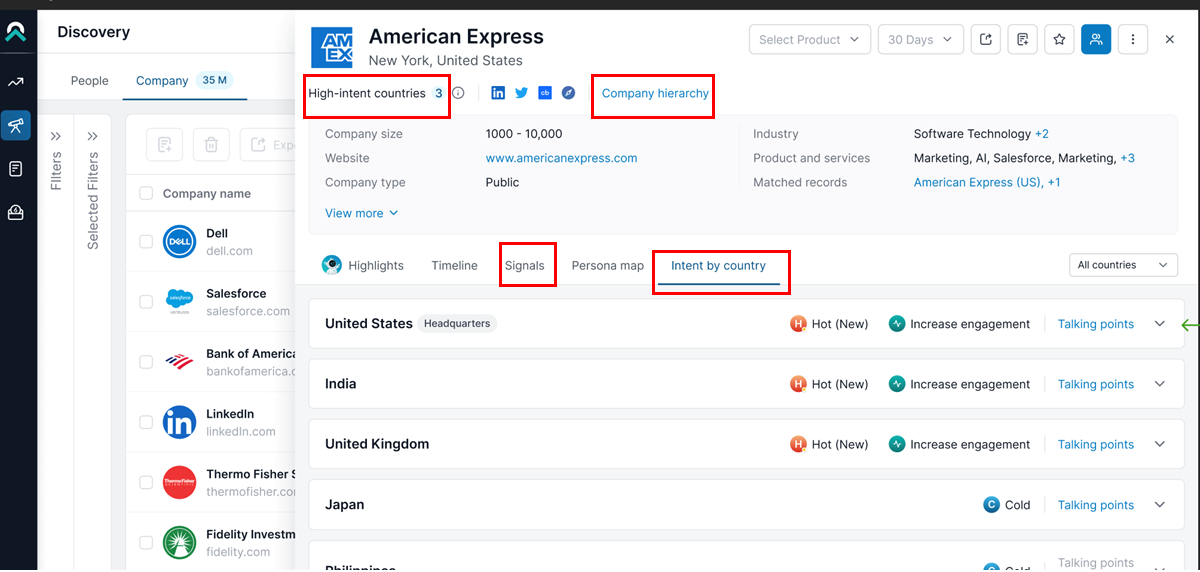
A new “Intent by Country” tab shows intent temperature, buying stage, engagement score, and activity by country.
Company Hierarchy moved from a separate tab to the top of the page; now only displays the actual HQ hierarchy (no country level records with same name and domain).
All signals (web visits, keyword research, technology used, psychographics, job postings) are now consolidated into a single Signals tab.
Dashboard
You’ll still see all CRM records matched in 6sense, including country-specific ones.
Filters are reorganized for clarity:
6sense Firmographics (HQ) → Filters apply to the HQ record.
6sense Intent → Intent country-specific filters.
Alerts
You’ll now receive one alert per HQ, instead of multiple per country.
Each user can set location preferences to get alerts for specific regions.
Lists and exports
Existing lists may appear smaller because country-level records are now merged under the HQ.
When exporting from Discovery, data now enriches the HQ record.
When exporting from CRM views, enrichment still happens at the country level.
Chrome extension
By default, the extension now shows insights across all locations for a company.
You have the option to switch to insights for a specific country.
Migration notes
Your saved lists and filters will automatically adjust to HQ level records.
Example: “Amazon India” and “Amazon UK” will now appear as “Amazon US” which is the HQ.