Data Workflows includes templates for common use cases. Templates help you start a workflow with a pre-existing set of nodes and conditions set to accomplish a certain goal.
To use a Data Workflow template, in Data Workflows select Data Workflows > Create.
Data Workflows displays the template list, using categories.
The following sections give brief descriptions of the template categories and their templates.
Enrichment templates
Some templates may be disabled, indicated by a Locked icon, if your company has not yet completed the Contact Data Compliance terms. If you see the alert “Contact acquisition and enrichment templates are blocked” contact your CSM for assistance.
Enrichment templates enrich any of your account, contact, and lead data in a scheduled, on-demand (one-time), or real-time cadence. This helps you keep CRM accounts, contacts, and leads updated.
All enrichment workflows apply to either accounts, companies, contacts, leads, or prospects, depending on your CRM or MAP.
For example, for HubSpot, these flows apply to contacts and companies:
Enrich CRM Contacts
Enrich CRM Accounts
Enrich CRM Leads
Also refer to Data Workflows Account Enrichment Example.
Prerequisites
An integrated CRM or MAP.
A mapping profile. Refer to Mapping Profiles.
Available Enrichment templates
Enrich CRM Accounts: Automate enrichment of account records.
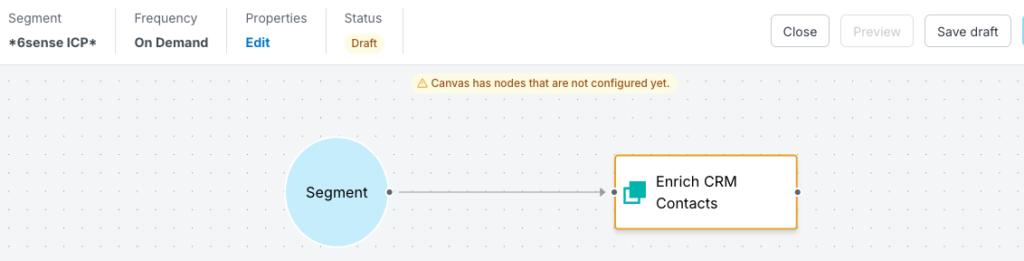
Enrich CRM Contacts: Automate enrichment of contact records.
Enrich CRM Leads: Automate enrichment of lead records.
Enrich CRM Accounts starting from a Segment: Automate enrichment of CRM account records starting from an existing segment.
Enrich CRM Contacts starting from a Segment: Automate enrichment of CRM contact records starting from an existing segment.
Enrich CRM Leads starting from a Segment: Automate enrichment of CRM lead records starting from an existing segment.
Enrich MAP Leads/Contacts/Prospects: Automate enrichment of MAP lead/contact/prospect records. Also refer to Data Workflows Enrich MAP Leads/Contacts/Prospects Template.
Enrich MAP Leads/Contacts/Prospects starting from a Segment: Automate enrichment of MAP lead/contact/prospect records starting from an existing segment.
Example enrich CRM contacts canvas
Re-enrich RevAI for Sales templates
Re-enrich RevAI for Sales templates re-enrich or update all records that have been previously exported from Sales Intelligence (SI). This helps ensure that all SI exported records are kept up to date if any firmographic or people data points have changed.
Also refer to Re-Enrich SI Records using Data Workflows for Salesforce.
Prerequisites
Sales Intelligence.
An integrated CRM.
A mapping profile. Refer to Mapping Profiles.
6sense credits. All records can be maintained for a 12 month period without deducting additional credits. The 12 month period begins from the date each record was exported from SI.
Available Re-enrich templates
Re-enrich Accounts: Re-enriches previously exported account records to your CRM.
Re-enrich Contacts: Re-enriches previously exported contact records to your CRM.
Re-enrich Leads: Re-enriches previously exported lead records to your CRM.
Example re-enrich leads canvas
.png)
New Audience Creation templates
New Audience Creation templates create new accounts in your CRM or MAP.
Prerequisites
An integrated CRM or MAP.
A mapping profile. Refer to Mapping Profiles.
Custom match rules.
Available New Audience Creation templates
Create New Accounts from a Segment: Creates new accounts in your CRM starting from an existing segment.
Create New Accounts and Purchase Contacts from a Segment: Creates new account and purchase contacts from a segment, then saves them to a CRM.
Create New Accounts and Purchase Leads to MAP: Create New Accounts and Purchase Leads to MAP.
Purchase Contact from a Segment: Purchase contacts, starting from existing segment, and save them to a CRM. Refer to Contact Purchase and Save to CRM.
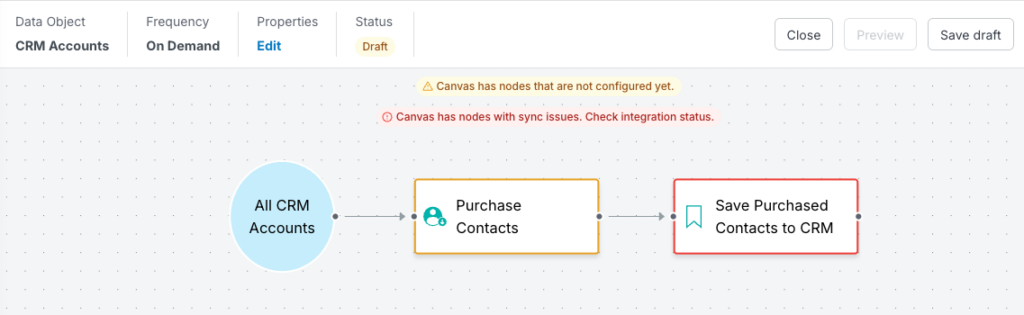
Purchase Contacts from Existing CRM Accounts: Purchase contacts, starting from CRM records, and save to a CRM. Refer to Contact Purchase and Save to CRM.
Example purchase contacts from existing accounts canvas
Export Scores templates
Export Scores templates export your 6sense scores into Salesforce or HubSpot, including 6sense predictive scores and 6QA status.
Also refer to Export Predictive Scores from Data Workflows.
Prerequisites
The Predictive add-on or the SI Enterprise plan.
An integrated CRM or MAP.
A mapping profile. Refer to Mapping Profiles.
Available Export Scores templates
Export to Accounts: Export your 6sense scores to Salesforce, HubSpot, or Dynamics accounts.
Export to Contacts: Export your 6sense scores into Salesforce, HubSpot, or Dynamics contacts.
Export to Leads: Export your 6sense scores into Salesforce or Dynamics leads.
Example export scores to leads canvas
.png)
Export Account Temperature template
The Export Scores template exports 6sense temperature scores, starting from CRM accounts, to your CRM for prospecting.
Also refer to Export Account Temperature Using a Data Workflow.
Prerequisites
The Predictive add-on or the SI Enterprise plan.
An integrated CRM.
A mapping profile. Refer to Mapping Profiles.
Example export account temperature canvas
.png)
Push Segment Names templates
Push Segment Names templates, for each record, write the segment name where each record currently exists.
Prerequisites and considerations
An integrated CRM or MAP.
A mapping profile. Refer to Mapping Profiles.
If using a segment, the segment must be published. Refer to Publish Segments.
Push Segment Name workflows also push fields mapped under Other Mappings. If you only want the segment names pushed, go to Other Mappings, select Override Mapping, and uncheck Enrich.
Available Push Segment Names templates
Push Segment Names to All CRM Accounts: Exports segment names directly to accounts in your CRM.
Push Segment Names to All CRM Contacts: Export segment names directly to contacts in your CRM.
Push Segment Names to All CRM Leads: Export segment names directly to leads in your CRM.
Push Segment Names to CRM Accounts from a Segment: Starting from a segment, export segment names to CRM account records.
Push Segment Names to CRM Contacts from a Segment: Starting from a segment, export segment names to CRM contact records.
Push Segment Names to CRM Leads from a Segment: Starting from a segment, export segment names to CRM lead records.
Push Segment Names to MAP Leads from All Records: Starting with MAP records, make segment names available within MAP leads. Also refer to Data Workflows Push Segment Names to MAP Example.
Example push segment names to MAP leads canvas
.png)
Lead to Account Match templates
Lead to Account Match templates first match leads to accounts, then update matched leads to contacts or update the lead with a value from the matched account.
Prerequisites and considerations
An integrated CRM or MAP.
A mapping profile. Refer to Mapping Profiles.
Available Lead to Account Match templates
Convert Matched Leads to Contacts from a Segment: Matches a lead to an account and covert matched leads to contacts under the matched accounts.
Update Lead from Matched Account from a Segment: Matches a lead to an account and updates the lead with a value from the matched account. For example, use this to export the account ID or name of a matched account. Starts from a segment.
Example update lead from matched account canvas
.png)
SI filter start node templates
(New in Aug 2026) You can set up a workflow that starts from an SI filter.
Prerequisites and considerations
An integrated CRM or MAP.
A mapping profile. Refer to Mapping Profiles.
Workflows starting from SI filters do not support real time frequencies.
All existing workflow nodes now support input based on SI filters. This includes:
Start node: Supports an SI filter as the data source
Create node: Works with SI-sourced data
Enrich node: Enriches records sourced from SI filters
Purchase node: Purchases contacts from SI-sourced data
Update node: Updates records from SI-sourced data
Decision node: Supports filter-based decisions similar to segments
Job Change node: Handles job change detection from SI sources
Lead-to-Account Match node: Matches leads to accounts from SI-sourced data
No special configuration is needed at the node level. The nodes automatically handle the SI filter input in the same way they handle other source types.
Available SI filter start node templates
Create New Accounts from a Filter: Create new accounts starting from an existing filter.
Purchase Contact from a Filter: Purchase contacts starting from an existing filter.
Create New Accounts and Purchase Contacts from a Filter: Create new accounts from a filter, purchase contacts, and push them to your MAP.
Enrich CRM Accounts starting from a Filter: Automate enrichment of CRM account records starting from an existing filter.
Enrich MAP Leads starting from a Filter: Automate enrichment of MAP lead records starting from an existing filter.
Convert Matched Leads to Contacts from a SI Filter: Execute a lead to account match and convert matched leads to contacts under the matched accounts, starting from an existing filter.
Update Lead from Matched Account from a SI Filter: Execute a lead to account match and update the lead with a value from the matched account. For example, push the Account ID or name of a matched account starting from an existing filter.
Enrich Job Change Data from SI Filter: Enrich an existing lead or contact with new job data when a job change is detected, starting from an existing filter.
Create or update leads/contacts in CRM from SI Filter: When a lead or contact changes companies, update the existing record and/or create a new one, starting from an existing filter.
Enrich CRM Leads starting from a Filter: Automate enrichment of CRM lead records starting from an existing filter.
Convert Matched Leads to Contacts from a SI Filter: Execute a lead to account match and convert matched leads to contacts under the matched accounts.
Update Lead from Matched Account from a SI Filter: Execute a lead to account match and update the lead with a value from the matched account. A common use case is to push the Account ID or name of a matched account.
SI list start node templates
(New in Aug 2026) You can set up a workflow that starts from an SI list.
Prerequisites and considerations
An integrated CRM or MAP.
A mapping profile. Refer to Mapping Profiles.
Workflows starting from SI lists do not support real time frequencies.
All existing workflow nodes now support input based on SI lists. This includes:
Start node: Supports SI list as the data source
Create node: Works with SI-sourced data
Enrich node: Enriches records sourced from SI lists
Purchase node: Purchases contacts from SI-sourced data
Update node: Updates records from SI-sourced data
Decision node: Supports list-based decisions similar to segments
Job Change node: Handles job change detection from SI sources
Lead-to-Account Match node: Matches leads to accounts from SI-sourced data
No special configuration is needed at the node level. The nodes automatically handle the SI list input in the same way they handle other source types.
Available SI list start node templates
Create New Accounts from a List: Create new accounts starting from an existing list.
Purchase Contact from a List: Purchase contacts starting from an existing list.
Create New Accounts and Purchase Contacts from a List: Create new accounts and purchase contacts starting from an existing list.
Create New Accounts, Purchase Leads, and Push to MAP from a List: Create new accounts from a list, purchase contacts, and push them to your MAP.
Enrich CRM Accounts starting from a List: Automate enrichment of CRM account records starting from an existing list.
Enrich CRM Contacts starting from a List: Automate enrichment of CRM contact records starting from an existing list.
Enrich MAP Leads starting from a List: Automate enrichment of CRM lead records starting from an existing list.
Convert Matched Leads to Contacts from a SI List: Execute a lead to account match and convert matched leads to contacts under the matched accounts, starting from an existing list.
Update Lead from Matched Account from a SI List: Execute a lead to account match and update the lead with a value from the matched account. For example, push the Account ID or name of a matched account starting from an existing list.
Enrich Job Change Data from SI List: Enrich an existing lead or contact with new job data when a job change is detected, starting from an existing list.
Create or update leads/contacts in CRM from SI List: When a lead or contact changes companies, update the existing record and/or create a new one, starting from an existing list.
Enrich CRM Leads starting from a List: Automate enrichment of CRM lead records starting from an existing list.
Convert Matched Leads to Contacts from a SI List: Execute a lead to account match and convert matched leads to contacts under the matched accounts.
Update Lead from Matched Account from a SI List: Execute a lead to account match and update the lead with a value from the matched account. A common use case is to push the Account ID or name of a matched account.
Document changelog
Aug 12 2026: New templates for SI filter and SI list start nodes
May 12 2026: Updates for contact data compliance