6sense API Token Management allows customers to self-service API token management while keeping track of their API consumption across all integrations.
6sense offers a variety of APIs, such as Company Identification API, People Enrichment API, Company Firmographics API and to name a few. 6sense API tokens are provisioned at the org level, which means that API tokens belong to your org and will work for APIs that your org is provisioned for.
You can create different API tokens to develop new integrations, test advanced use cases in sandbox or staging, or comply with internal corporate security policies. Assign the tokens to a specific integration from our 6sense partner ecosystem, or create a custom integration, and track the API usage of that integration. Give that token a name to help you remember where or how the API token is being used.
Why is this necessary?
6sense APIs are intended to give customers and partner integrations the ability to leverage 6sense data natively within other applications or platforms.
In the past, 6sense provided one API token which could be used for all integrations (this is your `default_existing_token`). This was intended to simplify access and token management.
However, as 6sense rapidly expanded its partner integration and API portfolio, many customers needed a way to track the API usage of each integration in isolation. Other customers preferred to optimize the API calls and “share” the API response across integrations–for those customers, keeping their API consumption low was a priority.
6sense API token Management puts the choice in the customer’s hands.
6sense suggests using the API in a secured environment like server-side integration and protecting your token from getting stolen.
API Token Definitions
Token
An API Token is an alphanumeric 40 random character long key phrase generated by 6sense, which will allow your organization access to 6sense APIs. Each API is associated with a type of token and will only work when you use correct one.
Types of Tokens
API Credit Type | Details about the Token and Credit Type |
|---|---|
Company Identification API | This API token only works for the Company Identification API. Know more about the API Credits deduction. |
6sense Credits | This API token only works for Enrichment APIs. For more information on 6sense Credits, see Credits Overview. You can use 6sense Credits on the following APIs: |
Lead Scoring API | This API token only works for Lead Scoring API. |
Segments API | This API token is only available when you want to integrate with an approved Partner. The token is shared over mail or support tickets and is not visible on the platform. |
Sales Intelligence App | This API token is only available for Revenue AI for Sales customers. Please reach out to support to get access to this Token. |
How to create an API token?
Click on Generate New API token button.
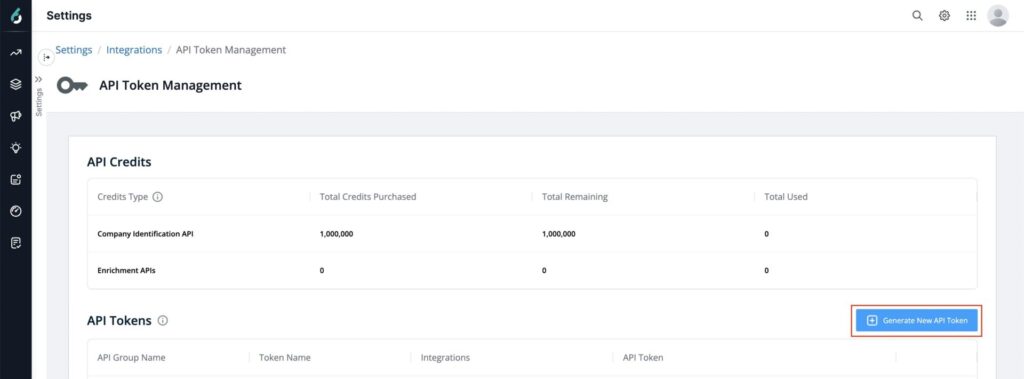
Select an API Group Name for which you want to generate a token.
Provide a Token Name (up to 26 characters) to help you remember what the token is used for. Token Name is also used to show the API usage for all the active and inactive API tokens. You can also add server-side or client-side in your token name.
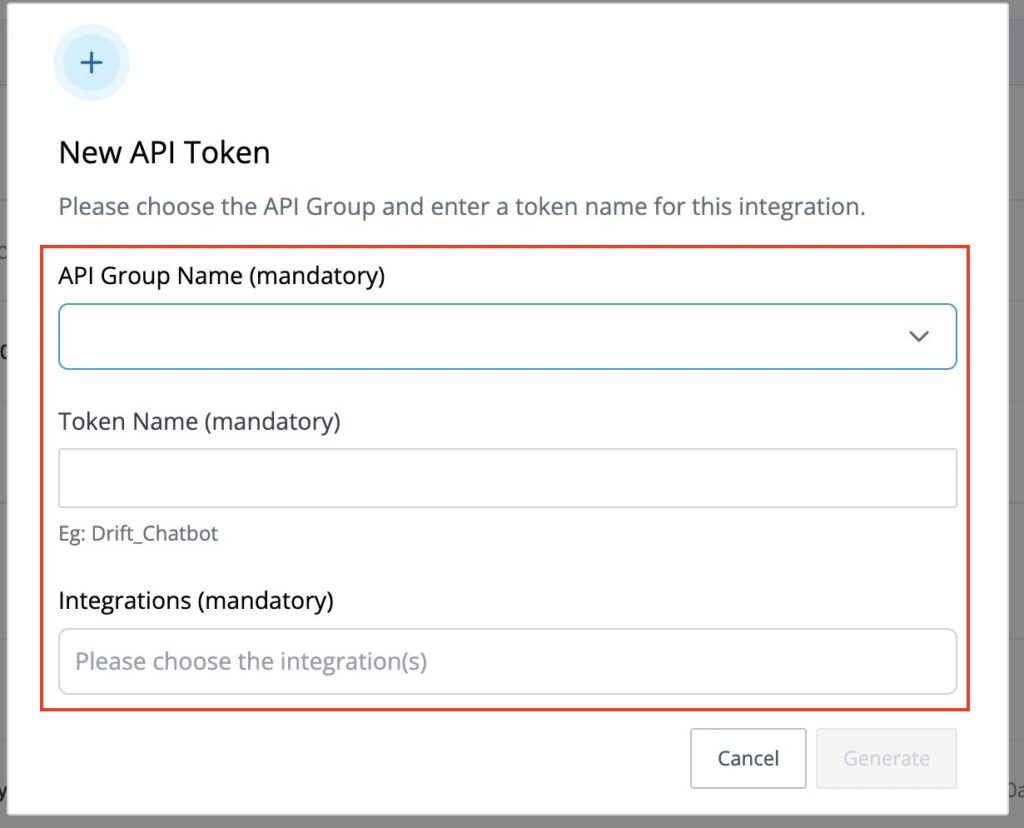
Select an Integration platform from the drop-down or provide a customer name by typing and pressing the Enter button. This will help you to know where the new token is utilized.
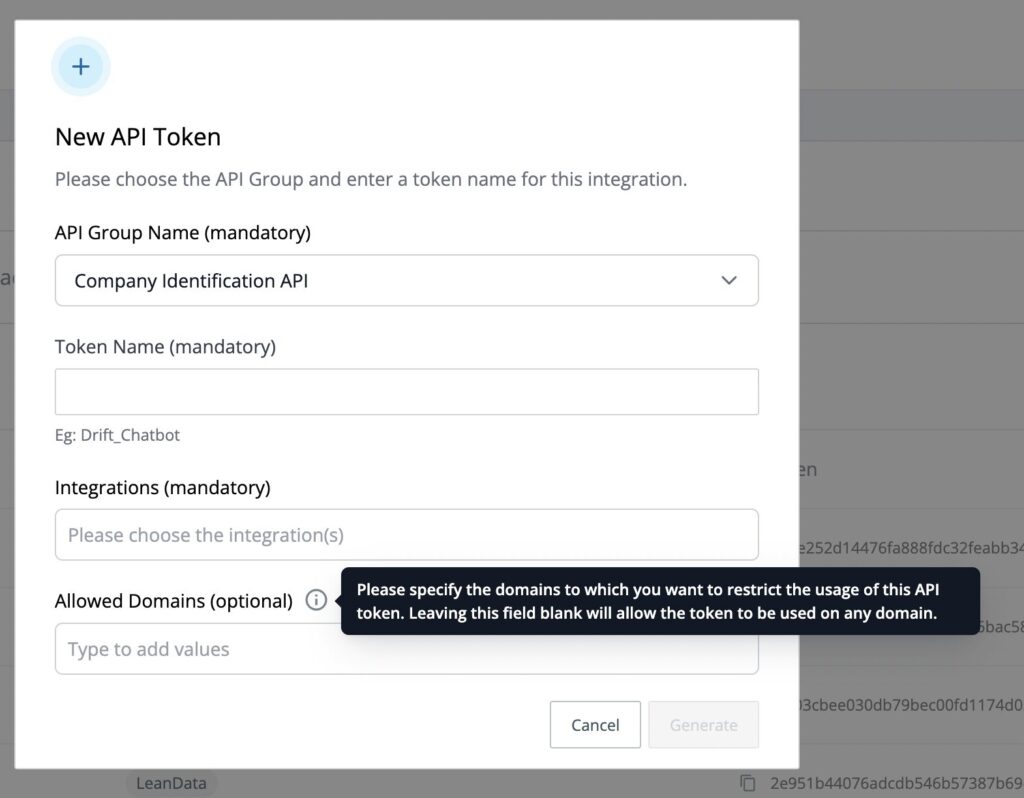
Add Allowed domains (this option is only available for Company Identification API only), if you want to restrict the usage of Company Identification API on selected domains.
Click Generate to generate an API token.
Some integrations can support both client and server-side deployment. Please check with your integration partner’s CSM to verify. API calls from the server side cannot be shared with any of the other integration partners.
Note: Hubspot, Eloqua, and Salesforce Marketing Cloud Account Engagement (Pardot) RTS applications automatically generate an API token and are hidden from the user, you do not need to create an API token for these RTS integrations.
You only need to create a token if you are using RTS within Marketo for API integrations like
API Tokens list
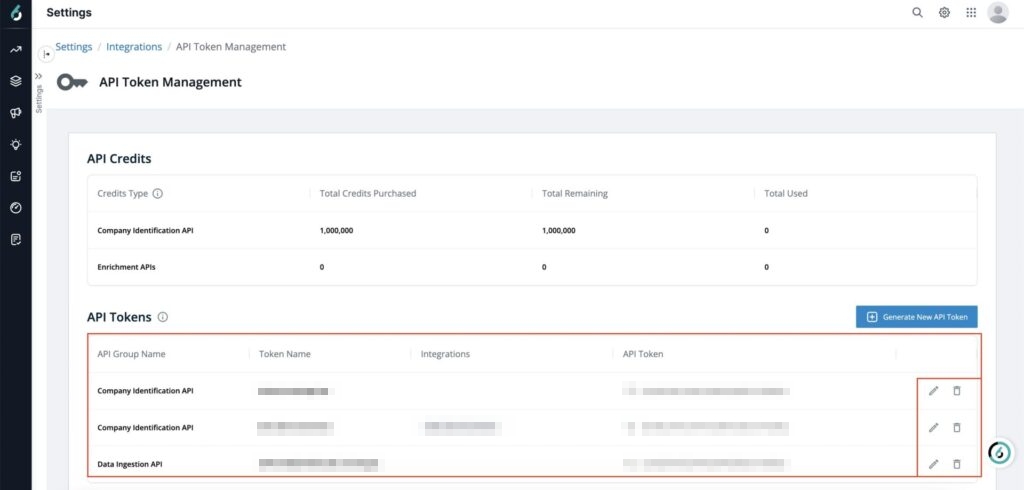
All the active API tokens are shown in the table. Any inactive API token will not be shown here.
You can edit the Token Name or the Integrations option.
You can also delete an API token. You must not delete/edit the API token for “Data Ingestion API” as that is used for Data import from your Partner integration like PeerSpot, Gartner, Tech target, etc.
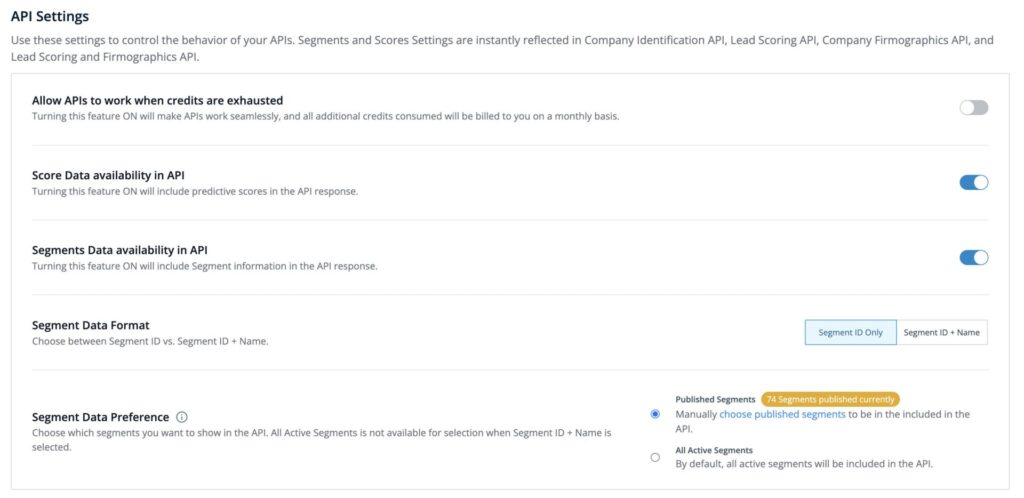
API Settings
You can control the availability of Segments and Scores information in Company Identification, Company Firmographics, Lead Scoring API, Lead Scoring, and Firmographics API. Know more
When you run out of API credits then, the API will stop working. If you want to continue using the APIs post the allocated API credits are consumed, then Toggle ON the “Allow APIs to work when credits are exhausted“.
All additional API credits consumed will be billed every month. Please speak to your CSM about the same.
Types of Credits for APIs
To use certain 6sense APIs, your organization must have sufficient credits.
API | Credit Model |
|---|---|
Company Identification API | API Credits |
People Enrichment API | 6sense Credits |
Company Firmographics API | 6sense Credits |
Lead Scoring & Firmographics API | 6sense Credits |
People Search API | No credits required |
Lead Scoring API | No credits required |
Company Identification API
The Company Identification API continues to use API Credits.
1 matched company = 1 API Credit.
The Company Identification API credit model is unchanged.
How API Credits are consumed
One matched Company Identification API response consumes one API Credit. Repeated identification of the same IP address counts toward API Credit consumption during the contract year.
When API Credits are exhausted
By default, the Company Identification API stops processing requests after all allocated API Credits have been consumed.
To continue using the API after credits are exhausted:
Navigate to the API settings.
Enable Allow APIs to work when credits are exhausted.
Additional API consumption is billed according to your agreement. Contact your Customer Success Manager (CSM) for more information.
Track API Credit Usage
You can track Company Identification API usage through:
The APIs page. To view API credit balances, go to Settings > Credits.
The SFF Usage Report
Enrichment APIs
Enrichment APIs use 6sense Credits. Administrators distribute 6sense Credits from the account credit pool to API (Enrichment). Enrichment requests consume credits from the allocated API (Enrichment) balance.
The following APIs consume 6sense Credits:
For more information about 6sense Credits, see Credits Overview.
FAQ
Q: Who can access the API token?
A: Primary Admin and Admin and Operation Users can Add, View, Edit, and Delete the API token.
Marketing and View only Users can only View the API token.
Insights and Sales User have no access.
Q: Which integrations don’t require an API token?
A: Your core CRM/MAP integrations, or intent integrations like G2, TrustRadius or Bombora don’t require any API token to be generated. For any other integration of the 6sense APIs, you must generate a token.
Q: How many tokens can I generate?
A: There is no limit currently. Token inventory and management is up to the responsibility of the customer.
Q: What’s the difference between token names and integrations?
A: Token integration is meant to help track the integrations or endpoints using the API token, while the token name is simply a flexible tool for you to assign a description to the token. The biggest difference is the token name is used in your API token usage reports while the token Integration is only visible on the API token management page. It may often make sense to choose an integration and name the API token using the same integration name.
Q: I assigned my API token to one integration, but actually used and deployed it in a different integration. Now what?
A: API tokens must be assigned to the integration where they are being used to properly track the usage. Change the assignment and name to the correct integration by editing to ensure that the API token tracks the correct integration.
Q: What happens to my API usage report if I delete a token?
A: Once you delete a token, you will not be able to view that token in the API token management page. However, the API usage and performance of your deleted API token will still be available for the last 12 months.